
Confirm every Shopify COD order before you ship it.
COD PRO asks the real customer on WhatsApp, a voice call or email, holds the order until they say yes, and lets only confirmed parcels leave your shelf.
- No Twilio or Meta setup
- Free to install, pay per message
- 13 customer languages
- 3,300+ stores installed
COD PRO's WhatsApp confirmation template, sent from COD PRO's verified business number. Your store name and products fill in the message.
Example: the customer receives COD PRO's WhatsApp confirmation template with the order summary, taps Confirm Order, and the order in Shopify changes from on hold to confirmed and released to ship.
See the story behind every order
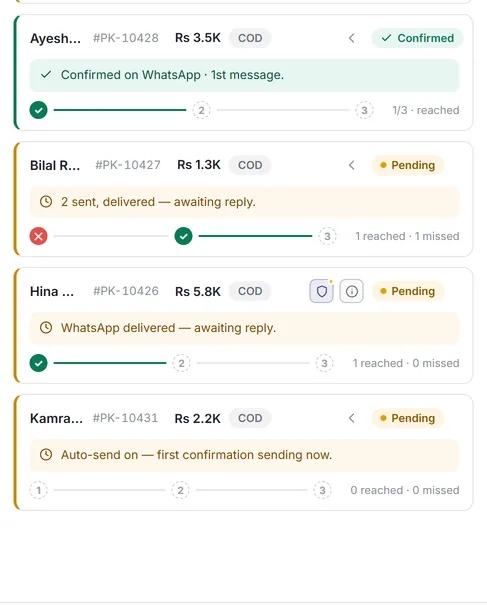
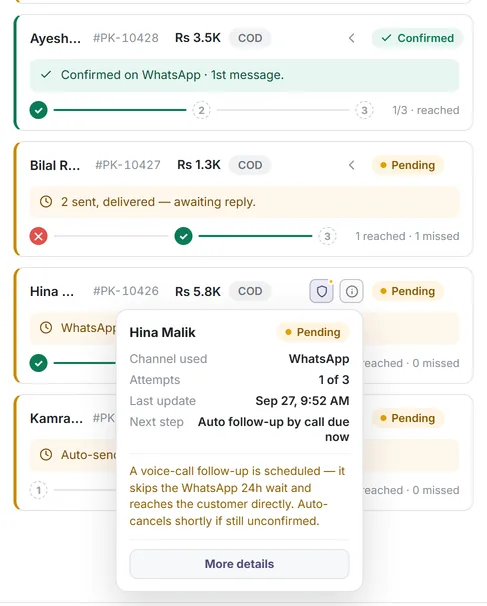
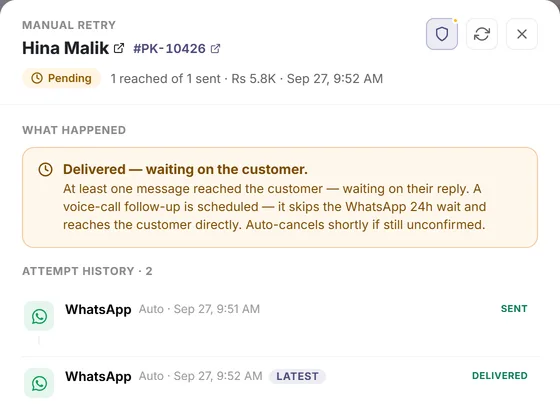
COD PRO shows what happened to each order right in your order list: which channel reached the customer, how many tries were used and what happens next. No digging through logs.
From "order placed" to "parcel shipped", with a yes in between
A COD order comes in
Your store takes the order as usual. COD PRO sees it within seconds.
It waits for a yes
Orders that match your rules get a Shopify fulfillment hold, so nobody packs them yet.
The customer confirms
They tap Confirm on WhatsApp, press 1 on a call, or open the link in an email.
Only real orders ship
The hold is released and the order is tagged. No reply? COD PRO follows up, and can cancel after your timer.
A Cash on Delivery button that checks the buyer first
Shoppers tap Buy with Cash on Delivery, choose a phone number or email, and try a six-digit code before adding delivery details. If a code cannot be sent, they can continue without verification. Shopify checkout opens with the details they entered.
- 1
Tap the COD button
Sits with your theme's buttons, in its style. In the Form Builder you choose the label, the button order, which theme buttons show and an optional sticky button.
- 2
Choose phone or email
Use WhatsApp, SMS or a call for a phone, or a six-digit code for email. One contact method is enough.
- 3
Verify or continue
A correct code marks the contact as verified. If sending fails, shoppers can continue unverified and the order follows the normal confirmation flow.
- 4
Check the order, then pay on delivery
Review items, total and delivery address; remove items if needed. Shopify checkout opens with the collected details. Only verified orders arrive Pre-Confirmed.
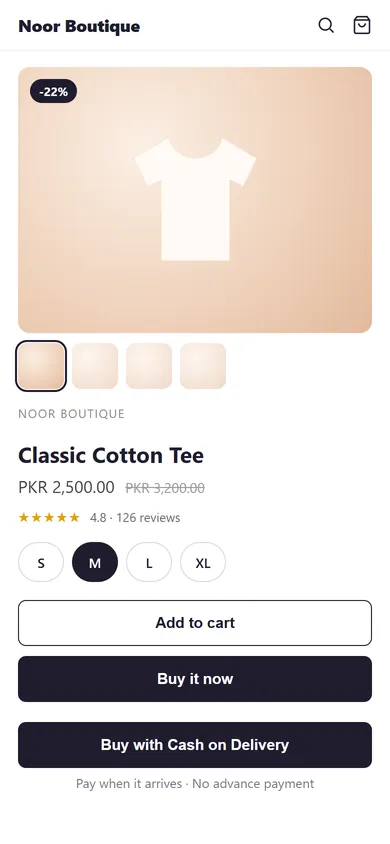
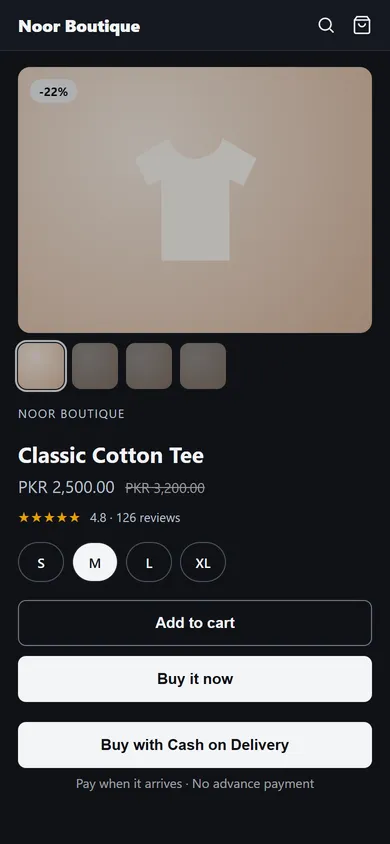
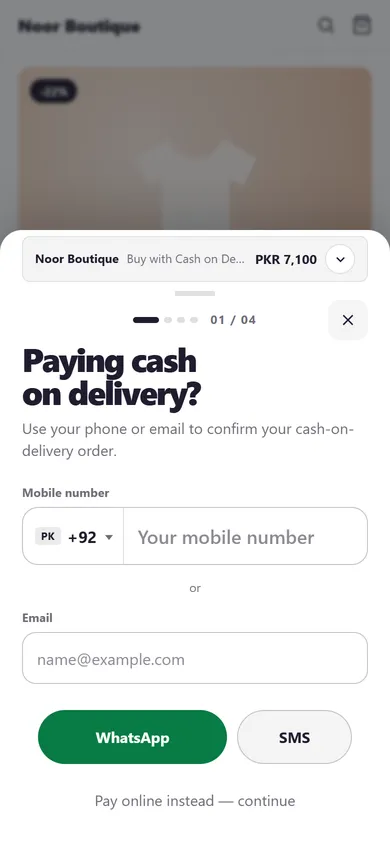
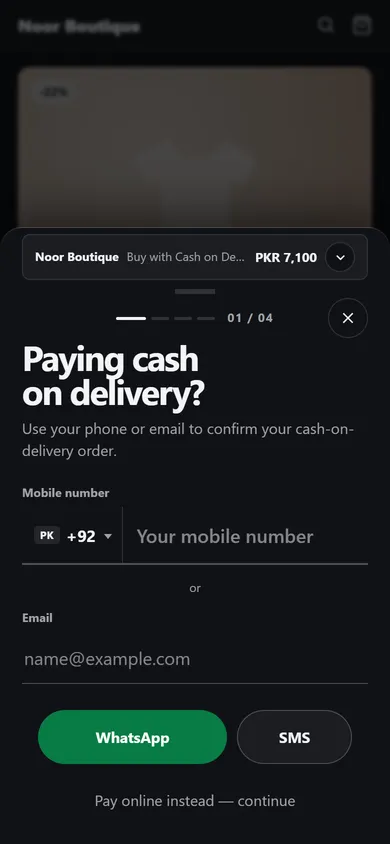
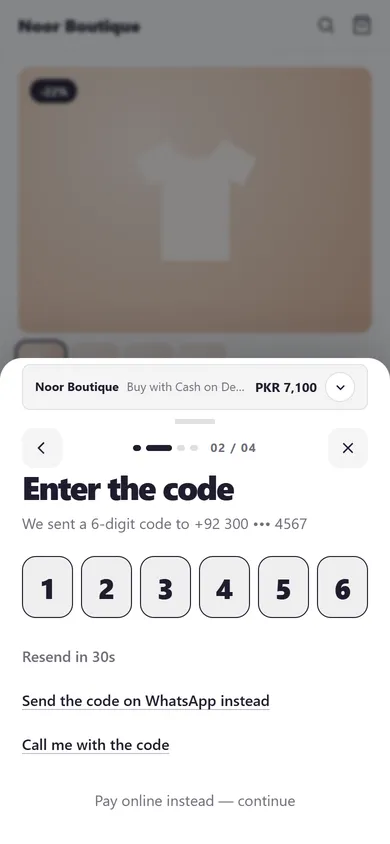
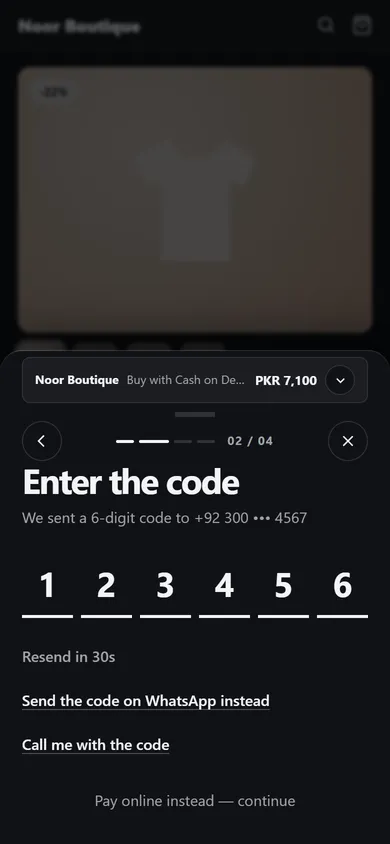
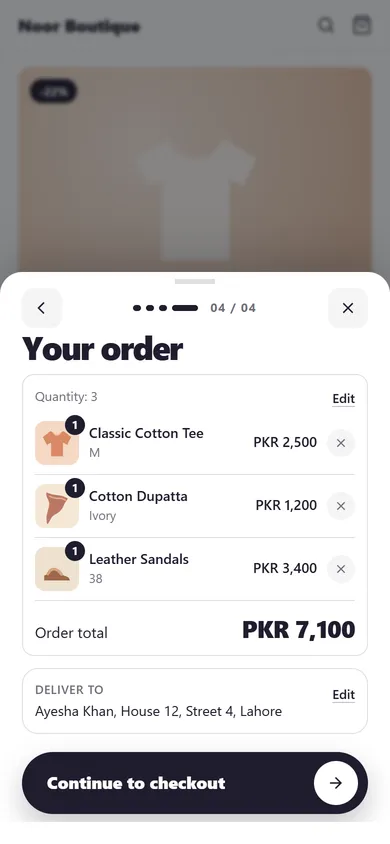
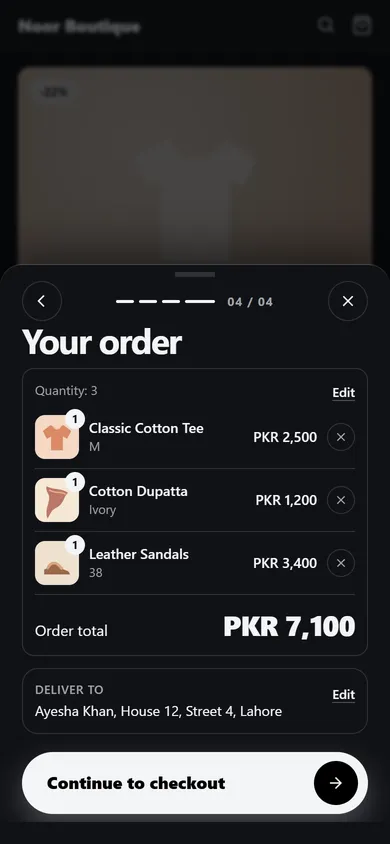
The screens are the real COD PRO form in your theme's colours.
Pre-Confirmed orders
Orders verified at the button arrive with one Pre-Confirmed badge and the channel that verified them, so no second confirmation message is sent.
Reach them on the channel they actually answer
Start with WhatsApp, fall back to a call or email. Pick one channel or combine them, automatically or by hand.
Hi Ayesha,
Thank you for shopping with Noor Boutique. Please confirm your order so that we can ship it on priority.
Here's your order summary:
Order ID: #1042
Product details: Linen kurta × 2
Order amount: Rs 6,400
Please click one of the buttons below
Confirm Order
Best first try in most COD markets: the customer taps Confirm or Cancel right in the chat.
+1 (555) 010-2398 Order confirmation call · example number
Transcript: "Hello there, this is an automated order verification call from our store. Press 1 to confirm your order. Press 2 to cancel your order. Press 3 to repeat the message."
Press play, then 1 to confirm or 2 to cancel.
For customers who don't reply to messages: an automated call reads the order and they press 1 to confirm. Press play and listen to the real call, in any of the 13 languages.
Your Noor Boutique verification code is 482913. It expires in 10 minutes.
Number verified
At the Cash on Delivery button, shoppers who prefer SMS get a one-time code to prove the number is theirs. On WordPress stores, SMS also confirms orders.
Noor Boutique · Order confirmation
Confirm Your Order To Seal The Deal 🚀🔑
Please confirm your order
Hi Ayesha, thank you for shopping with Noor Boutique. Please confirm your order so that we can ship it on priority.
- Order ID
- #1042
- Payment method
- Cash on delivery
- Order amount
- Rs 6,400
Confirm OrderCancel Order
The lowest-cost channel, ideal as a follow-up or when the order only has an email address.
Examples. Wording follows the templates in your COD PRO settings and the customer's language.
The messaging is already set up. You just switch it on.
Doing this yourself means a Twilio account, a WhatsApp Business verification, template approvals and code. COD PRO has already done that work, on approved senders, so you can confirm your first order today.
On your own
- Open and verify a Twilio account
- Get Meta to approve a WhatsApp sender
- Write and approve message templates
- Build the confirm, hold and cancel logic
With COD PRO
- Install from the Shopify App Store
- Choose channels and languages
- Top up your wallet
- Orders start confirming themselves
Everything around the order, not just the OTP
- Shopify COD Form with OTP Verification COD PRO adds a "Buy with Cash on Delivery" button beside your theme buttons.
- COD order confirmation COD order confirmation is for Shopify sellers who need a clear customer reply before they prepare a cash-on-delivery order.
- Auto mode: COD confirmation at the lowest cost In Auto mode COD PRO chooses the channel for you.
- Order hold for unconfirmed COD orders Order hold places a real Shopify fulfillment hold on the orders you choose, so nobody packs or ships them yet.
- Order timeline and customer history for COD COD PRO keeps a clear history for each order and each customer.
- Manual mode, manual sending and one-click pause COD PRO does not force automation on you.
- Prepaid wallet with a full usage ledger COD PRO runs on a prepaid wallet with a full usage history.
- Address risk checks Address risk checks are for COD sellers who want to spot an address that may cause a delivery problem and ask the customer to correct it.
- Abandoned-cart recovery Abandoned-cart recovery is for Shopify sellers who want to send a message to shoppers who leave before placing an order.
- Shipment notifications Shipment notifications are for sellers who want to keep customers informed after an order ships.
- Customer campaigns Customer campaigns are for sellers who want to email customers about a newsletter, a win-back message or new arrivals.
- Built-in AI assistant COD PRO has an AI assistant built into the app.
- Customer messages in 13 languages Multi-language messaging is for COD sellers serving customers in more than one language.
3,300+ stores have installed COD PRO. Here is what sellers told us.
“The best app for confirmation so far. I will use it for a long time.”
“Una aplicación perfecta para mí, resuelve el problema de las verificaciones. Ya no tengo que preocuparme por la devolución de pedidos falsos.”
“An invaluable tool for my business! This app effectively tackles verification issues, ensuring genuine orders and minimizing the risk of fraudulent returns.”
Works with your store, and with your AI
- ShopifyOne-click install, works with Shopify checkout.
- Lovable BetaBuilt your Shopify store with Lovable? Install and go.
- WooCommerce BetaThe COD PRO plugin for WordPress stores.
- AI agents and MCP Let Claude, ChatGPT or your own agent check orders and reports.
- Developer APIScoped Agent API keys for your own tools.
Built for AI agents
Connect COD PRO to Claude, ChatGPT, Cursor or your own agent. Everything here is live and documented, and you decide what each connection can do.
MCP server, read-only
Ask Claude, ChatGPT or Cursor about your orders, stats and wallet. 8 read-only tools, customer contacts masked, and you approve access inside Shopify.
Connect the MCP server{"mcpServers":{"codpro":{"url":"https://codpro.khaalti.app/mcp"}}}Agent API
One HTTPS endpoint and 15 named tools. Each agent gets its own scoped key, every call is logged, and one switch pauses it. An OpenAPI spec describes every tool.
Agent API quickstart
Free to install. Pay only for the messages you send.
A prepaid wallet, priced by channel and by your customer's country. No monthly fee needed to start; Enterprise is $20 a month with a 3-day trial.
Rates follow carrier and WhatsApp prices. For the latest rate, check Pricing inside the COD PRO app.
All countries and plans| Country | SMS | Call / min | |
|---|---|---|---|
| Pakistan | $0.095 | $0.553 | $0.247 |
| India | $0.086 | $0.163 | $0.150 |
| United Arab Emirates | $0.101 | $0.198 | $0.380 |
| Saudi Arabia | $0.096 | $0.275 | $0.323 |
| Egypt | $0.089 | $0.476 | $0.286 |
| Morocco | $0.089 | $0.304 | $0.883 |
| Brazil | $0.092 | $0.140 | $0.127 |
| Italy | $0.115 | $0.173 | $0.128 |
| Portugal | $0.102 | $0.130 | $0.575 |
| United States | $0.088 | $0.088 | $0.094 |
Improved every week, secured every day
COD PRO is actively built and maintained. New features ship regularly, security fixes ship first, and every release is listed in the changelog.
- Form Builder: choose your product-page buttons, with a live preview in your store's own look
- Pre-Confirmed orders: name, delivery and billing address arrive filled in at Shopify checkout
- MCP server so Claude, ChatGPT and Cursor can read your orders, next to the Agent API
- Fairer reminders: abandoned-cart messages at most once per shopper every 30 days, on your store's own domain
Questions sellers ask
What does COD PRO do?
COD PRO confirms cash-on-delivery orders with the real customer before you ship. It sends the order details by WhatsApp, automated voice call or email, the customer confirms or cancels, and COD PRO updates the order in your store.
Do I need a Twilio account or WhatsApp Business approval?
No. Messages go out from COD PRO's own approved senders and templates, so you can start the same day without setting up Twilio, Meta or a WhatsApp Business account.
How much does it cost?
COD PRO is free to install. You pay per message from a prepaid wallet, and the price depends on the channel and the customer's country. The Enterprise plan is $20 a month with a 3-day free trial.
Which languages can my customers get messages in?
Customers can receive messages in 13 languages, including English, Arabic, French, Spanish, Italian and Portuguese.
Does it work with a store I built with Lovable?
Yes. Lovable builds real Shopify stores, so you install COD PRO from the Shopify App Store and order confirmation, order holds and shipment messages work as usual.
What is the cheapest way to confirm COD orders?
Use Auto mode. COD PRO tries the lowest-cost channel first, email, then WhatsApp, then a voice call, and stops the moment the customer replies, so you pay as little as possible per confirmed order.
Can I see every message sent for an order?
Yes. Each order has an attempt history with the channel, time, delivery result and the customer reply, and each customer has a profile with their earlier orders.
Can I send confirmations manually?
Yes. Any message type, or the whole app, can run in manual mode. You choose the channel and send from the order, confirm or cancel many orders at once, or pause COD PRO with one switch.
Can I stop unconfirmed orders from being shipped?
Yes. Order hold places a Shopify fulfillment hold on the orders you choose and releases it automatically when the customer confirms.